E Ticket Railway Gov BD Registration
To create a Bangladesh Railway e-ticket account, first open the official website: eticket.railway.gov.bd. At the beginning of the registration process, the website will ask you to verify your NID details. After completing the NID verification, you can create your e-ticket account.
Important: Enter your personal information, NID number, and date of birth only on the official Bangladesh Railway website.
How to Register on E Ticket Railway Gov BD
Step 1: Open the Official Website
First, open the official Bangladesh Railway e-ticket website in your browser:
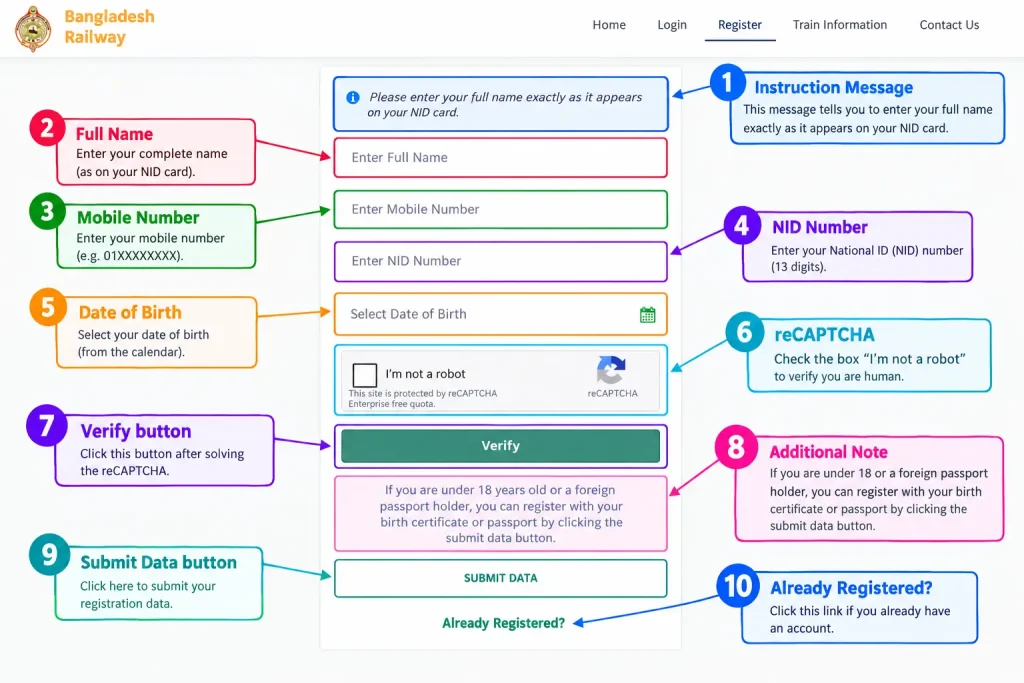
On the registration page, you will see a Please Verify Your NID form under the Registration heading.
Step 2: Enter Your Full Name
Enter your Full Name in the first box.
Write your name exactly as it appears on your NID card. Check the spelling, spaces, and order of the name carefully. If your name is written in capital letters on your NID card, it is better to use the same spelling.
Example: MD RAHIM UDDIN
Step 3: Add Your Mobile Number
In the second box, enter your active mobile number. Use a mobile number that you regularly use, as you may receive verification or account-related information via SMS.
- Enter the number correctly.
- If a country code is required, enter it according to the website’s format.
- Do not use someone else’s mobile number.
Step 4: Enter Your NID Number
Now enter your National ID card number in the Enter NID Number box.
When entering your NID number:
- Double-check all the digits.
- Do not add any extra spaces.
- Do not use another person’s NID number.
- Make sure the details match the information on your NID card.
Step 5: Select Your Date of Birth
Click on the “Select Date of Birth” box and choose your date of birth. Your date of birth must exactly match the information on your NID record. If it does not match your NID information, the verification process may fail.
Step 6: Complete the reCAPTCHA
Below the form, you will see the “I’m not a robot” reCAPTCHA box. Click on the box. If an image verification appears, follow the instructions and select the required images to complete the verification. Once the reCAPTCHA is completed, a green checkmark may appear.
Step 7: Click the Verify Button
Now, click the Verify button.
The website will verify your name, mobile number, NID number, and date of birth. During the verification process:
- Do not refresh the page.
- Do not press the Back button.
- Keep your internet connection stable.
- If the details do not match, check the error message and correct the information.
Step 8: Users Under 18 or Foreign Passport Holders
If you are under 18 years old or a foreign passport holder, you can register using your birth certificate or passport by clicking the Submit Data button.
Step 9: Use the Submit Data Button
If you want to register using a birth certificate or foreign passport instead of NID verification, click the SUBMIT DATA button.
Carefully fill in the required information and enter the details exactly as shown on your documents.
Step 10: Complete Account Registration
After successful NID verification, the website will take you to the next registration page. You may be asked to provide additional account details, such as:
- Email address
- Password
- Confirm password
- Address or other required information
Fill in all the required details and submit the registration form. Once your account is created, you can access the Bangladesh Railway e-ticket portal using your registered mobile number or login details.
Conclusion
Registering for an E Ticket Railway Gov BD account is simple when you follow each step carefully. Verify your NID or required document details, complete the registration form, and keep your login information safe for future Bangladesh Railway ticket bookings.